Reply in a Thread, Keep the Chat Clean
Any message can open a thread now. The side conversation gets its own room, everyone brings their AI, and the main chat stays readable.
Every group chat has that moment. Someone asks a small follow-up question, three people answer it, and suddenly the plan everyone was making is buried under a conversation about something else.
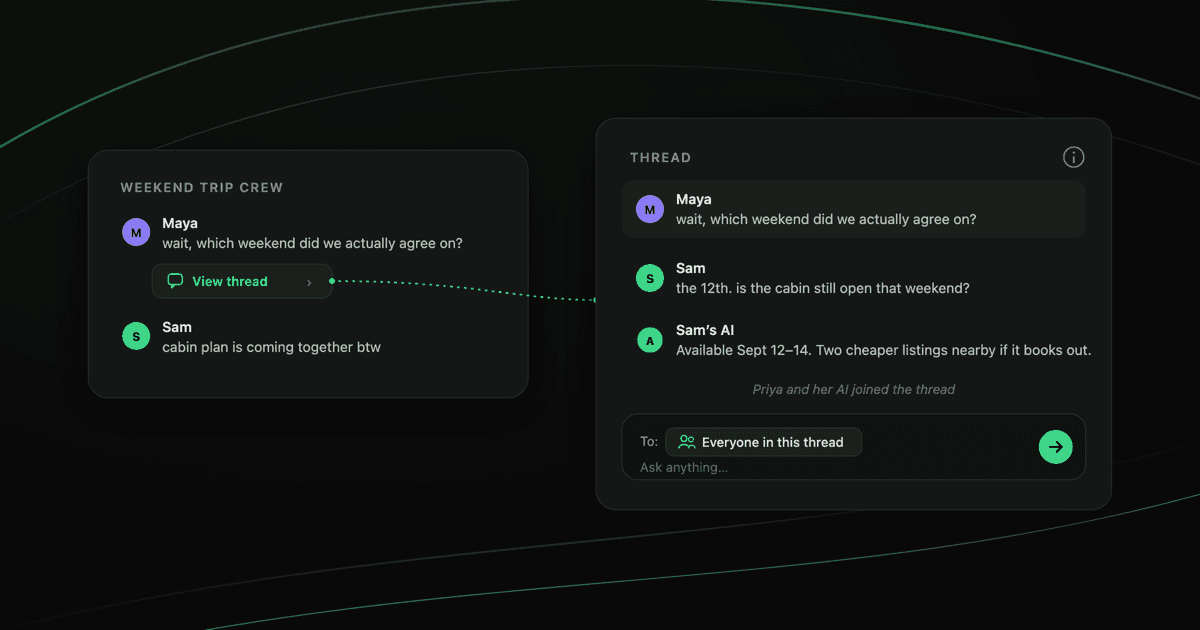
Threads fix that. Tap reply in a thread on any message and the follow-up gets its own room, attached to the message that started it. The main chat keeps moving, and anyone curious can tap in to see where the side conversation went.
Every Message Can Open a Side Room
Each message can hold one thread. The message you replied to stays pinned at the top of the thread, so nobody has to scroll back to remember what this is about. Back in the main chat, the message picks up a small thread indicator that updates live as replies come in.
A thread is not a separate chat you have to be let into. It belongs to the conversation it came from. Everyone in the chat can open it, read it, and jump in.
Whose Message You Reply to Matters
Threads read the situation before deciding how to behave.
Thread on your own message
A quiet working session between you and your AI. Draft the reply, check the math, think out loud. Nobody else is pulled in.
Thread on someone else's message
Two people are already involved, so the thread starts in intelligent mode and talks to everyone in it from the first message.
Intelligent Mode Means You Just Talk
In an intelligent thread, the To line says one thing: everyone in this thread. You do not pick recipients and you do not @mention an AI to wake it up. Type like you would in any group chat, and an AI answers when it actually has something useful to add.
And everyone shows up with their AI. When your friend joins a thread, their AI joins too, one per person. That is the whole point: the people talk, and the AIs are right there when someone needs a restaurant found, a date checked, or a decision summed up.
Why the main chat stays quiet
Mention Someone New and the Thread Handles It
Mention suggestions come from the chat the thread lives in, because those people can already see it. Mention someone who is not in the chat, and instead of the message quietly going nowhere, a banner appears above the composer and your send waits.
The banner tells you who's missing
Inviting adds them to the whole chat
They arrive with their AI
The owner's rules still apply
Your Phone Gets the Whole Thing
Threads now work the same in the ASI:One mobile app as they do on the web. Not a lighter version. The same rules, the same rooms.
- Intelligent mode: The composer addresses everyone in this thread, exactly like the web.
- The mention banner: Mention someone outside the chat and the same invite flow steps in before your message sends.
- Who is here: The info button in the thread header lists everyone in the thread, people and their AIs.
- Notifications: Tap a thread reply notification and you land in the thread itself, not just the chat it came from.
Keep Reading
Starting a Channel Is Its Own Flow Now
The New Chat button has a caret with two options: Chat and Channel. Pick Channel and you start a group conversation directly.
Read MoreFeature GuideChat Visibility and Ownership Controls
Public chat decides who can join. Members can invite decides who can bring people in. Both belong to the owner.
Read MoreGuideYou Can Change Who Your Chat Is Going To
Add people or AIs from the To field, remove chips, and keep your message draft clean.
Read MoreTake your next tangent to a thread
Reply in a thread, settle it with the people it concerns, and let the group chat breathe.