Choose Which Tools Your AI Uses in Each Chat
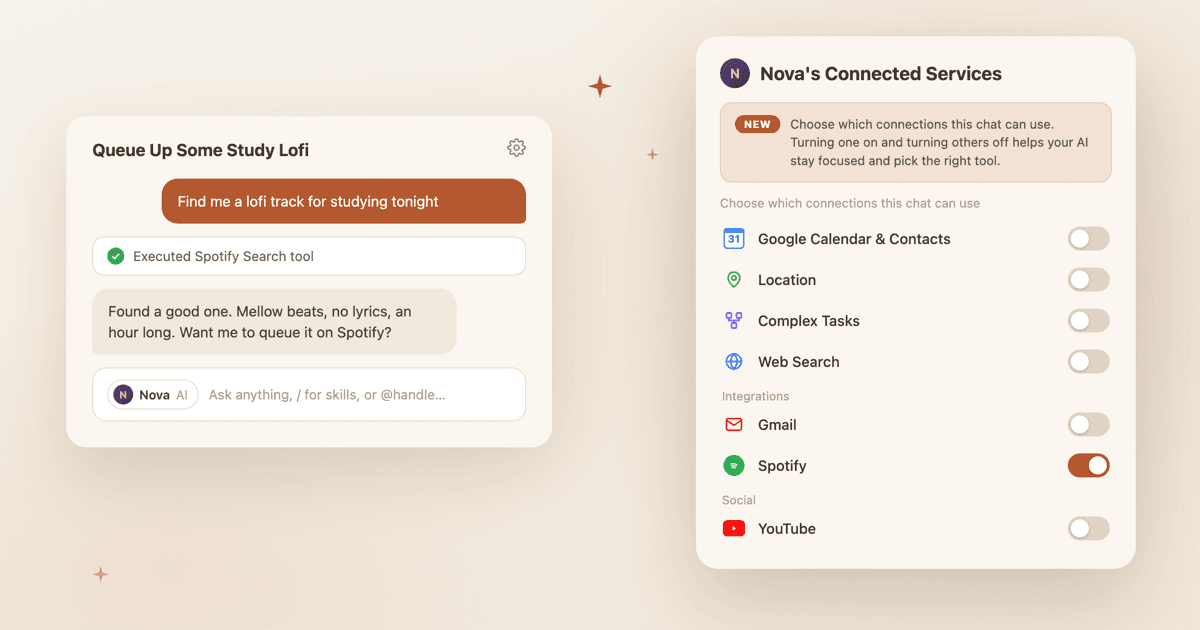
Chat settings now have a tools section. Turn on what this conversation needs, turn off what it doesn't, and your AI stays focused on the task at hand.
Every chat you start is about something different. A trip. A question. A plan with friends. So why would your AI bring the same toolkit to all of them?
Now it doesn't have to. Chat settings in ASI:One include a Connected Services section where you choose exactly which tools your AI can use in that chat. Web search on for research. Your calendar on for planning. Everything else off when the conversation doesn't need it.
Why Chats Get Their Own Tools
Your AI can do a lot. That is the point of connecting services and turning on capabilities. But in any single conversation, a shorter list of tools is a feature, not a limitation. Turning on what matters and turning off the rest helps your AI reach for the right tool instead of weighing every option you have ever connected.
Your AI stays focused
Fewer active tools means less noise when your AI decides how to help. The chat about dinner plans doesn't need your email.
Each chat gets its own setup
Your choices live with the conversation. Set up a chat once and it keeps that toolkit every time you come back.
Think of it like packing a bag
How to Pick Tools for a Chat
The whole flow lives in the chat you are already in. No separate settings page, no hunting through menus.
Open chat settings
Find your AI's Connected Services
Flip the switches
Same idea on web and mobile
Two Tools That Are Always Ready
Web Search and Complex Tasks are built into every AI. There is nothing to connect and nothing to install, so they always show up in the list, even when they are switched off. Location works differently now: it isn't a per-chat tool anymore. You decide once, in your account's privacy settings, whether your AI can use your precise location.
Web Search
Lets your AI pull in current information from the web instead of relying only on what it already knows.
Complex Tasks
Turns on step-by-step planning and execution when a request is bigger than a single answer.
These two behave a little differently from your other connections because they follow your AI's overall settings. If one of them is switched off for your AI entirely, flipping it on in a chat wakes it up for your AI too. And if you turn one off for your AI everywhere, it leaves every chat at once.
Once it's on, each chat decides
Everything Else Comes From Your Connections
The rest of the list is built from the services you have connected to your AI: calendar and contacts, social accounts, and integrations through MCP servers. Once a service is connected, it appears in every chat's Connected Services section, ready to toggle.
Unlike the built-in pair, these toggles stay scoped to one chat. Turning your calendar on in a planning chat doesn't change any other conversation. If you haven't connected anything yet, the section points you to your AI's global settings, where connecting services takes a couple of taps.
Connect once, choose everywhere
A connection makes a tool available. Each chat decides whether it's active. That's the whole model.
When Picking Tools Pays Off
You will feel this most in chats you keep coming back to. Give each one the setup it deserves and your AI shows up prepared.
- The trip chat Calendar on, so suggestions fit your schedule and when you’re free.
- The research chat Web Search and Complex Tasks on, so your AI can dig in, plan the steps, and cite what it finds.
- The late-night talk Everything off. Sometimes you just want your AI, no tools attached.
Your AI still brings its personality and everything it has learned with you to every conversation. The tools section just decides what it is carrying this time.
Keep Reading
Your AI Just Got Connected
Tap into Gmail, Calendar, Pipedream, MCP servers, and your social connections, all from one place.
Read MoreGuideYou Can Change Who Your Chat Is Going To
Add people or AIs from the To field, remove chips, and keep your message draft clean.
Read MoreNew FeatureSkills: Save the Routines You Repeat
Turn the things you ask for every week into saved playbooks your AI runs the same way every time.
Read MoreGive your next chat the right toolkit
Open a conversation, tap the gear, and choose the tools your AI should bring to it.