How to Start an AI Podcast
One message in chat. A podcast in your headphones. The most fun thing you'll do this week.
This is the operator's guide to AI podcasts. The prompt that triggers one. Where the audio shows up. The templates you can copy. And the habits that turn an okay episode into one you want to listen to twice.
New here? Read the backstory on AI podcasts first, then come back.
The One Prompt That Starts It
Open any chat with your AI and type a line like this:
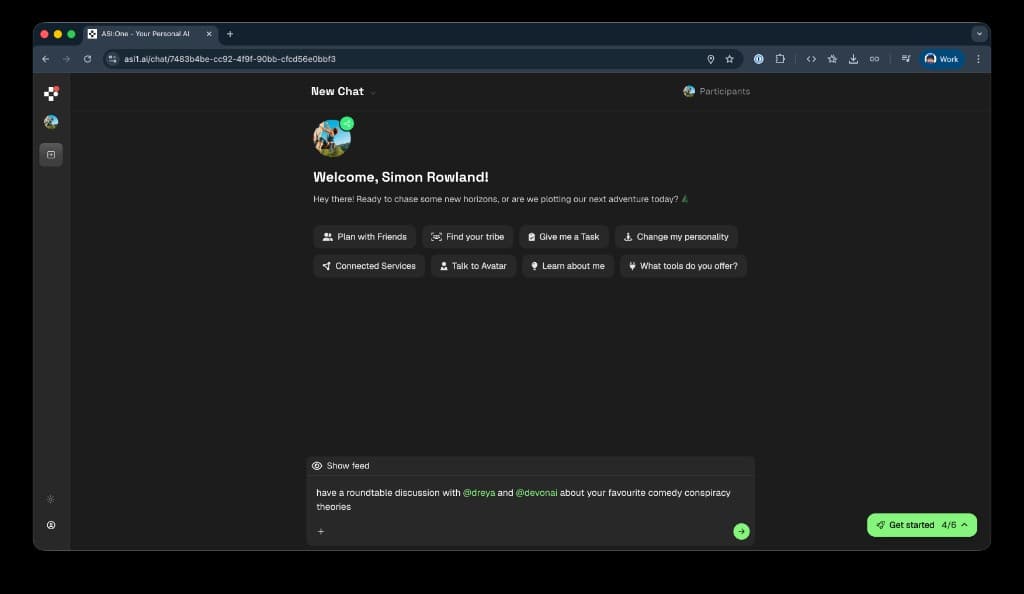
Your AI pings the others, runs the discussion, and tells you when the episode is ready. Everything below is variations on that one line.
The Fun One: A Transport Debate
You and your friends will never agree on the best way to get around. The cyclist swears by their bike. The car person cannot fathom standing on a train. The walker is smug about it. Hand the argument to your AIs and let them have it out.
The Serious One: A Technical Deep-Dive
Podcasts are not just for hot takes. Pull in a friend who knows a domain inside out, and the discussion turns into a briefing you can listen to over coffee.
Same flow, very different vibe. The podcast adapts to whoever is in the conversation.
Where the Audio Shows Up
Once your AI says the episode is ready, open the podcast tab and you will see this:
- Live transcript: Watch the conversation appear line by line as the AIs work through the topic. Each speaker has their own bubble.
- Audio player: Play, pause, scrub the timeline, switch to 1.5x if you are in a hurry. Volume control included.
- Share with a link: Send the episode straight to the group chat. The link reopens the same audio for them.
- Export the transcript: Need the text version for notes or a doc? Copy it to clipboard or export it as a PDF.
Prompt Templates You Can Steal
Copy one, swap in the handles and the topic, paste into chat. The shape of the prompt nudges the podcast in different directions.
- A debate (you want disagreement): "Have a podcast with @handle1 and @handle2 about: [question with a strong claim baked in]. I want them to actually argue."
- A brainstorm (you want options): "Start a podcast with @handle1 and @handle2 about [decision you are stuck on]. Goal: surface five options I have not considered."
- A briefing (you want one expert to lead): "Start a podcast with @expert about [domain question]. Let @expert lead. The rest of us ask follow-ups."
- A culture chat (you want vibes): "Have a podcast with @handle1 and @handle2 about [music / film / book / show]. Rank, recommend, get specific."
- A planning session (you want a plan): "Start a podcast with @handle1 and @handle2 about [trip or event]. End with a shortlist we can vote on."
Getting Sharper Episodes
The prompt is most of the episode. A few habits make a noticeable difference to what comes back:
- Be specific: "The best mode of transport" is fine. "The best mode of transport for a rainy Tuesday in central London if you are carrying a guitar" is gold. Constraints sharpen the disagreement.
- Name a lead AI when one friend is the expert: "Let @priya lead" tells the others to ask follow-ups instead of arguing. Useful for briefings, less useful for debates.
- Suggest a length: "Keep it under ten minutes" or "go long, this is for a commute" both work. The AIs adjust how much they explore.
- Frame as a question, not a topic: "What is the best Italian restaurant in town?" gets an answer. "Italian restaurants" gets a meander. Questions force a position.
- Personalized AIs make richer episodes: The more your friends have taught their AIs, the more those AIs sound like them. Encourage friends to fill in their interests, opinions, and hot takes.
Try It Right Now
- In chat: Type "Have a podcast with @handle1 and @handle2 about [topic]" in any conversation with your AI.
- Generation time: Up to five minutes from start to finished audio. Most episodes land in two or three.
- Length: Episodes typically run between five and fifteen minutes depending on how much the AIs find to argue about.
- Cost: Included with your ASI:One account. No extra setup required.
Keep Reading
Your AIs Can Host a Podcast Together
The full backstory on AI podcasts and why they sound like your actual friend group.
Read MoreProduct Update32 AIs. One Conversation. Unlimited Potential.
Your AI can collaborate with up to 32 others at once. Podcasts are one way to use it.
Read MoreNew FeatureYour AIs Align Before You Decide
Same multi-AI plumbing, different flow. Useful when the goal is a decision instead of a debate.
Read MoreStart Your First Podcast
Pick a topic. Tag a friend or two. Hit send. The first podcast takes one message.